
Features

It reads the screen. Then it plays.

Automatoes reads the game window with Windows OCR, follows the steps you saved in a preset, and keeps the rounds going until you press Esc.

What it does

The loop behind every round.

Every click starts with something it saw on screen. These are the parts that run between Start and Stop.

01

Reads the screen with Windows OCR

Each step has a region on screen and the text it expects. Automatoes reads that region with the Windows OCR engine and moves on only when the words match, so a slow load does not become a wrong click. It does not read game memory or change game files.
02

Presets hold the setup

A preset is the screens, steps, clicks and tower spots in one file. Use the preset that comes with the app, build your own, or import one. The preset marked Runs on Start is the one F10 plays.

03

Maps keep their own towers

Each map has its own tower spots and camera moves. Automatoes reads the map name on screen and uses the layout saved for that map.

04

Dry Run, before you commit

Dry Run writes every click, key and drag it would make to the log and touches nothing. Check a new preset without giving up your mouse.

05

Joins back in after a disconnect

When the game shows the reconnect button, Automatoes clicks it and starts the preset again. A lost connection does not end the session.

06

Start, pause, resume, stop

The buttons on Home do the same as the keys. Pause holds the run where it is, Resume carries on, and Stop ends it.

07

Stats for the session

Wins, losses, rounds played and session time sit on the Stats page, counted from what the screen shows.

08

Every step in the log

The log records each detection, click and tower placement with the time it happened. Copy it or open the log file when something needs a closer look.

In the app

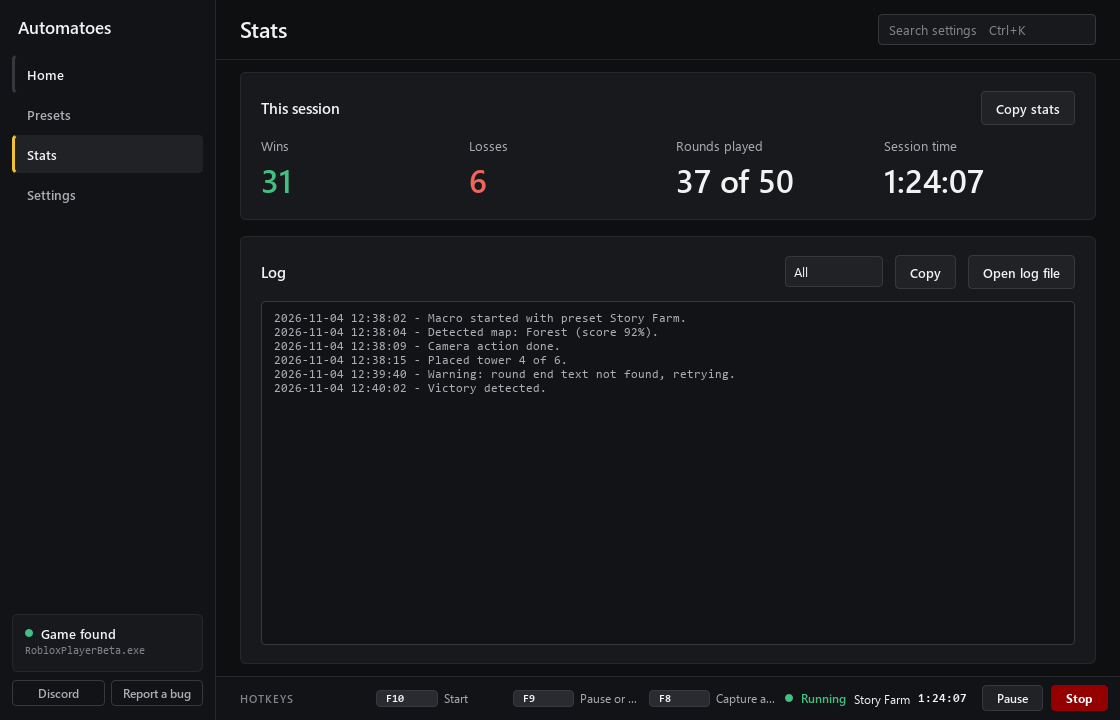
The Stats page during a run.

The log is the run in plain words: what it detected, what it clicked and when.

The Automatoes Stats page during a run: wins, losses, rounds played and session time, with a log of a detected map, a placed tower and a victory.

How a run works

From preset to next round.

Seven steps, repeated until you stop it.

  1. Pick a preset

    Choose the setup and click Use this preset. It becomes the one that runs on Start.

  2. Press F10

    Automatoes puts the game window back in place and reads the first screen.

  3. It reads the screen

    Windows OCR turns the words in the step's region into text, and the step waits for the match.

  4. It clicks the next button

    When the screen matches, it clicks the button the preset points at and moves on.

  5. It places your towers

    Tower by tower, each one goes to the spot saved for that map.

  6. It starts the next round

    The end of a round takes it back to the start screen, and it begins again.

  7. It joins back in

    If the game disconnects, it clicks Reconnect and starts the preset again.

Keys

Four keys do the work.

They work while the game has focus, so there is no need to alt-tab. Press F10 to start, F9 to pause and Esc to stop. F7 puts the game window back where it belongs if it moves.

Pause holds the run where it is. Press F9 again to carry on.

Hotkeys

  • F10 Start
  • F9 Pause and resume
  • Esc Stop
  • F7 Pin the game window

Give it a run.

One file for Windows. It installs itself, opens, and waits for F10.

Works on
Windows 10 and 11
Reads the screen
Windows OCR
Costs
Nothing, it is a free beta